

I still remember the first time I tried juggling clients while traveling. My inbox felt chaotic, bookings slipped through cracks, and I spent more time fixing mistakes than planning trips. That’s when I realized I needed a solid freelance travel workflow setup—something that could run smoothly whether I was at my desk or working from a beach café.
Over time, I built a routine that feels less like “work” and more like a system that supports my lifestyle. If you want to manage clients, plan trips, and still enjoy your own travels, this approach will help you stay organized without burning out.
Why Does a Freelance Travel Workflow Setup Make Life So Much Easier?

When I didn’t have a system, every new client felt like starting from scratch. I repeated the same steps, forgot details, and wasted time switching between tools. Once I created a proper workflow, everything clicked into place.
A good freelance travel workflow setup gives you structure without making your day feel rigid. You know exactly what happens when a client reaches out, how you move them through planning, and how you deliver their trip. That clarity saves energy.
It also helps you stay consistent. Clients notice when your process feels smooth and professional. That consistency builds trust, which often leads to repeat bookings and referrals.
How Do I Handle Client Onboarding Without Missing Leads?

I treat onboarding like the front door of my business. If it feels messy, people walk away. So I made it simple and automated wherever possible.
I use tools like Zoho or Travefy to collect inquiries through forms. This way, even when I travel, I don’t miss a potential client. Every lead enters my system already organized, which saves me from digging through emails later.
Then I schedule discovery calls using Zoom. I keep these calls relaxed and conversational. I ask about their travel style, budget, and expectations. This step helps me connect with them and understand what they really want.
After the call, I send contracts through Dropbox Sign and invoices via Wave. I don’t delay this part. Quick follow-ups show professionalism and keep momentum going.
What Does My Planning Process Actually Look Like Day to Day?

Planning trips is where I add real value. I stopped sending static PDFs a long time ago because they felt outdated and hard to update.
Now, I build interactive itineraries using tools like Travefy or TripCreator. I map out each day, include booking details, and add notes that make the trip feel personalized. Clients love being able to access everything in one place.
I also use Notion as my “brain.” I store research, client preferences, and ideas there. When I sit down to plan, I already have everything organized, so I don’t waste time searching for information.
For visuals, I design simple destination guides in Canva. These guides make my work look polished without adding extra stress to my workflow.
How Do I Manage Bookings Without Losing Control?
Booking used to stress me out the most. There are too many moving parts—flights, hotels, transfers, and timing. So I created a system that keeps everything in check.
If you work independently, platforms like Amadeus or Sabre help you access real-time inventory. If you’re with a host agency, their portal usually handles this step.
I also rely on automation. Tools that track flight changes or delays keep me informed without constant checking. This saves me time and helps me respond quickly when something changes.
Here’s how I keep my booking process organized:
| Task | What I Do |
| Flights | Confirm routes, timings, and baggage |
| Hotels | Double-check location and reviews |
| Transfers | Arrange airport pickups early |
| Extras | Add tours or experiences |
This simple structure keeps me from missing details.
What Does a Travel-Ready Work Setup Look Like?
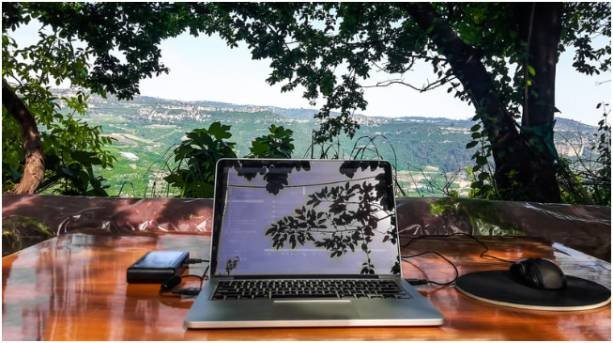
Working while traveling sounds exciting until your laptop dies or your internet fails. I learned this the hard way.
Now I travel with a lightweight laptop and a reliable power bank. I never depend on public Wi-Fi alone. I use eSIMs or hotspots so I always stay connected, especially during client calls.
Time management also plays a huge role. I follow a simple routine where I block time for deep work and separate time for calls. I use a Pomodoro-style rhythm—focused work sessions followed by short breaks.
This setup helps me stay productive without feeling overwhelmed. It also gives me space to actually enjoy the places I visit.
How To Build Your Own Freelance Travel Workflow Setup Step by Step
When I built my freelance travel workflow setup, I didn’t do it all at once. I created it step by step, testing what worked and adjusting along the way.
Start by setting up a simple lead capture system. Use a form that collects all essential client details. This step saves time later and keeps everything organized from the beginning.
Next, define your onboarding process. Decide how you will communicate, send contracts, and collect payments. Keep this process consistent so every client gets the same experience.
Then, choose your digital nomad tools for planning. Pick one itinerary builder and one organization tool like Notion. Avoid using too many platforms. Simplicity always wins.
After that, create a booking routine. Write down your checklist and follow it every time. This habit reduces errors and builds confidence in your workflow.
Finally, prepare your travel setup. Make sure your tech, internet, and schedule support your work style. This step turns your workflow into something you can rely on anywhere.
What Tools Do I Actually Use Every Week?
I don’t believe in using every tool available. I stick to what works and keeps my process simple.
| Category | Tools I Use |
| CRM / Leads | Zoho, Travefy |
| Itineraries | TravelJoy, TripCreator |
| Communication | Zoom, WhatsApp Business |
| Finance | Wave, PayPal |
| Organization | Notion |
This combination covers everything without overwhelming me.
Why Post-Trip Support Is My Secret Weapon?
Most people forget about clients after the trip ends. I don’t. This is where I build long-term relationships.
After a trip, I check in with clients and ask about their experience. I keep the tone casual, like catching up with a friend. This simple habit often leads to referrals.
I also collect feedback and testimonials. These help me improve my services and build credibility.
Over time, this approach turns one-time clients into repeat customers. That consistency makes a huge difference in income stability.
So… Is Your Freelance Travel Workflow Setup Working for You or Against You?
If your days feel scattered and stressful, your system might be the problem—not your workload. I’ve been there, and I know how exhausting it feels.
A strong freelance travel workflow setup gives you freedom. You spend less time fixing mistakes and more time doing meaningful work. You also enjoy your own travels without constant interruptions.
The goal isn’t perfection. The goal is a system that supports your lifestyle and grows with your business.
Key Takeaways
- A structured workflow reduces stress and saves time
- Automation helps you manage clients from anywhere
- Interactive itineraries increase your value
- A reliable tech setup keeps your work consistent
- Post-trip support builds long-term income
At the end of the day, your workflow should feel like a quiet assistant—not another thing you have to manage. Build it once, refine it often, and let it carry you wherever you go.
FAQs
1. What is a freelance travel workflow setup?
It’s a structured system that guides how you manage clients, plan trips, handle bookings, and support travelers. It keeps your work organized and consistent, even when you’re on the move.
2. Do I need expensive tools to start?
Not at all. You can start with simple tools like Notion, Zoom, and PayPal. Upgrade only when your workload grows and you need more automation.
3. How long does it take to build a workflow?
It usually takes a few weeks of testing and refining. Start small, adjust as you go, and focus on creating habits that make your process smoother.
4. Can I manage this workflow while traveling full-time?
Yes, if your setup includes reliable internet, good time management, and clear systems. A strong workflow actually makes full-time travel much easier.